How Microsoft Business Central Can Streamline Financial Management for SMBs
Here are some of the key challenges SMBs are facing:
1.Surging data, legacy systems, and static reporting: Data is the new strategic asset for CFOs. The amount of data in the world is doubling every year and many companies have not yet created their “single source of the truth”. Many others are living with legacy systems created 20 years ago. They’re using static reports and don’t have the ability to drill down to find insights. 2.Inadequate tools to anticipate growing business complexity: Business is becoming more complex every day. Having outdated tools that were built for old business models isn’t effective even in the best of times. It’s especially challenging in times of uncertainty when we need to make rapid decisions and adjustments. 3.Manual, inefficient and error-prone processes: Many customers still have manual, inefficient and error-prone finance processes, and sometimes the people managing these processes are great at what they do but subject to human error (closing, reconciliations, invoice processing, etc.) 4.Increasing regulations, risks, and threats: Finally, as the world grows, there are new business risks and threats, and a need for increased regulations. We can’t rely on manual processes. We need to develop our tools to proactively help us mitigate risks.
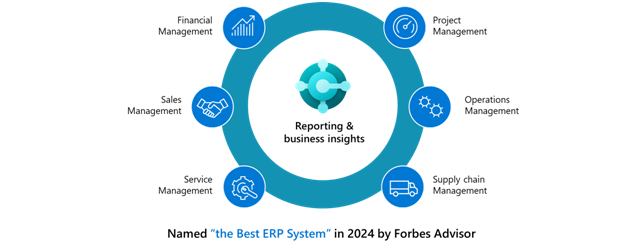
To help SMBs overcome these challenges and make their visions a reality, Microsoft offers Dynamics 365 Business Central, is a connected business management solution that enables you to adapt faster, work smarter, and perform better. Connected means you can bring together your finance, sales, services, and operations teams within a single, easy-to-use application to get the insights needed to drive your business forward and be prepared for what’s next.
Streamline financial management using Microsoft Dynamics 365 Business Central Take control of financial data: Better manage your cash flow, bank reconciliations, fixed assets, budgeting, and project costing while shortening cycle times with the late payment–prediction extension.
Expand into global markets: Easily support multiple currencies, exchange rates, consolidations, intercompany transactions, and localized tax regulations.
Accelerate financial closing and reporting: Reduce month- and year-end closing times with connected general ledger, accounts receivable, payables, and fixed assets data. Streamline approval workflows using Power Automate
Monitor financial performance: Use built-in reports, Excel, or Microsoft Power BI and unlimited data dimensions to get real-time cash flow, identify financial patterns, analyse trends, and improve business planning.
Make more profitable financial decisions: Connect reports, charts, and Power BI data from across accounting, sales, purchasing, and inventory teams to get accurate insights and make financial decisions with confidence.
Automate workflows and processes: Optimize performance using easy-to-create workflows, audit trails, enterprise-level security, and AI.
Conclusion Microsoft Business Central provides a comprehensive set of tools that simplify financial management, including data centralization, process automation, real-time insights, and compliance assurance. Utilizing these features, businesses can boost efficiency, make more informed decisions, and foster growth. For those seeking to revolutionize their financial management, Microsoft Business Central is an excellent choice.
In today’s fast-paced business environment, efficiency and productivity are paramount. Companies are increasingly turning to integrated software solutions to streamline operations and enhance productivity. One such powerful tool is Microsoft Dynamics 365 Business Central, a comprehensive business management solution designed for small to medium-sized enterprises. Integrating Business Central with other business tools can significantly boost productivity, reduce manual tasks, and provide deeper insights into business operations. This blog explores the benefits and methods of integrating Business Central with other essential business tools.
The Power of Microsoft Business Central
Microsoft Business Central is an all-in-one business management solution that helps businesses connect their financials, sales, service, and operations. It provides robust functionality across various business processes, making it easier to manage finances, inventory, and customer interactions. However, the true potential of Business Central is realized when it is integrated with other business tools. This integration allows businesses to create a seamless flow of information, automate workflows, and gain a comprehensive view of their operations.
Key Benefits of Integration
1. Enhanced Data Consistency and Accuracy
Integrating Business Central with other tools ensures that data is consistent across all platforms. This reduces the chances of errors that often arise from manual data entry and synchronization. When data flows automatically between systems, businesses can trust the accuracy of their information, leading to better decision-making.
2. Improved Efficiency and Productivity
Integration eliminates the need for duplicate data entry and manual data transfers. By automating these processes, employees can focus on more strategic tasks, enhancing overall productivity. For example, integrating Business Central with a Customer Relationship Management (CRM) system like Salesforce can automate the transfer of sales data, reducing administrative workload and speeding up sales cycles.
3. Better Financial Management
Integrating Business Central with accounting tools like QuickBooks or Excel can streamline financial management. Real-time data synchronization ensures that financial records are always up-to-date, facilitating accurate financial reporting and analysis. This integration helps in budgeting, forecasting, and compliance, giving businesses better control over their finances.
4. Enhanced Customer Relationship Management
Integrating Business Central with CRM tools allows businesses to gain a 360-degree view of their customers. By combining financial and customer data, businesses can better understand customer behavior, preferences, and purchasing patterns. This insight can drive personalized marketing strategies and improve customer service.
5. Streamlined Supply Chain Operations
Integration with supply chain management tools can optimize inventory levels, improve order accuracy, and enhance supplier relationships. By having real-time visibility into inventory and supply chain operations, businesses can reduce lead times, minimize stockouts, and improve overall supply chain efficiency.
Popular Integrations with Business Central
1. Microsoft Power BI
Integrating Business Central with Microsoft Power BI allows businesses to create rich, interactive reports and dashboards. Power BI can pull data from Business Central to provide detailed insights and analytics, helping businesses make data-driven decisions. This integration empowers users to visualize financial performance, sales trends, and operational metrics in real-time.
2. Microsoft Office 365
Seamless integration with Office 365 enhances collaboration and productivity. Employees can access Business Central data directly within familiar tools like Outlook, Excel, and Word. For instance, sales quotes or invoices can be created and sent directly from Outlook, streamlining the workflow and reducing the time spent switching between applications.
3. E-commerce Platforms
Integrating Business Central with e-commerce platforms like Shopify or Magento ensures that sales data, inventory levels, and customer information are synchronized in real-time. This integration helps manage online orders more efficiently, update inventory automatically, and provide timely customer service.
4. Third-Party CRM Systems
Beyond Microsoft Dynamics CRM, integrating Business Central with third-party CRM systems like Salesforce or HubSpot can provide a unified view of customer data. This integration allows sales and customer service teams to access financial data, order histories, and support cases in one place, improving customer interactions and satisfaction.
Implementation Considerations
While the benefits of integrating Business Central with other business tools are clear, it’s important to approach integration strategically. Here are some key considerations:
1. Assess Business Needs
Identify the specific needs of your business and prioritize integrations that will provide the most value. Consider the pain points in your current workflows and how integration can address them.
2. Choose the Right Tools
Ensure that the tools you choose to integrate with Business Central are compatible and can support seamless data flow. Leverage tools that offer robust APIs and integration capabilities.
3. Plan for Data Migration
Plan the data migration process carefully to ensure a smooth transition. Test the integration in a controlled environment before full deployment to identify and resolve any issues.4. Ongoing Support and Maintenance Integration is not a one-time task. Regularly monitor and maintain integrations to ensure they continue to function correctly and adapt to any changes in business processes or software updates.
Conclusion
Integrating Microsoft Business Central with other business tools is a powerful strategy to enhance productivity, improve data accuracy, and streamline operations. By leveraging the capabilities of Business Central and complementary tools, businesses can create a cohesive, efficient, and data-driven environment. As technology continues to evolve, the potential for integration will only expand, offering even greater opportunities for businesses to optimize their operations and achieve their goals.
In today’s digital age, businesses are constantly seeking ways to streamline processes, boost productivity, and enhance decision-making. One powerful tool that has emerged to meet these demands is the Microsoft Power Platform. Comprising Power BI, Power Apps, Power Automate, and Power Virtual Agents, this platform offers a comprehensive suite of tools to empower organizations. Let’s delve into the top five benefits of implementing the Microsoft Power Platform for your business.
1: Enhanced Productivity and Efficiency The Microsoft Power Platform enables businesses to automate repetitive tasks, reducing manual effort and freeing up valuable time for employees to focus on more strategic initiatives. Power Automate, for instance, allows you to create automated workflows that connect your apps and services, eliminating the need for manual data entry and minimizing errors. This streamlined approach not only enhances productivity but also leads to cost savings by optimizing resource utilization.
2: Data-Driven Decision Making Data is the lifeblood of modern businesses, and the Power Platform equips organizations with powerful tools to harness data insights effectively. Power BI, a robust business analytics tool, enables users to visualize data through interactive reports and dashboards. These insights facilitate informed decision-making, allowing businesses to identify trends, track KPIs, and uncover actionable insights that drive growth and innovation.
3: Solutions Tailored to Your Business Needs One of the key advantages of the Microsoft Power Platform is its flexibility and customization capabilities. With Power Apps, organizations can build custom applications tailored to their unique business processes without extensive coding knowledge. Whether it’s creating a customer relationship management (CRM) system, automating approval workflows, or developing a mobile app, Power Apps provides a low-code environment that accelerates app development and deployment.
4: Seamless Integration with Existing Systems Integration plays a crucial role in optimizing business operations, and the Power Platform seamlessly integrates with a wide range of Microsoft and third-party applications. Whether you use Office 365, Dynamics 365, SharePoint, Salesforce, or other business tools, Power Platform connectors ensure smooth data flow and interoperability. This interoperability not only enhances collaboration across teams but also enables a unified view of data for better insights and decision-making.
5: Empowering Citizen Developers The Power Platform empowers citizen developers—non-technical users within an organization—to create and deploy applications without extensive IT support. With intuitive drag-and-drop interfaces and pre-built templates, users can quickly build apps, automate workflows, and analyze data, reducing dependency on IT resources and accelerating innovation cycles. This democratization of app development fosters a culture of innovation where ideas can be transformed into tangible solutions rapidly.
Conclusion In conclusion, the Microsoft Power Platform offers a myriad of benefits that can transform how businesses operate in today’s dynamic landscape. From enhancing productivity and enabling data-driven decisions to fostering innovation and empowering citizen developers, the Power Platform equips organizations with the tools they need to thrive. By harnessing the power of Power BI, Power Apps, Power Automate, and Power Virtual Agents, businesses can unlock new levels of efficiency, agility, and competitiveness. Embracing the Power Platform is not just a technological upgrade but a strategic investment in future-proofing your business for success.
Web development is a complex and ever-evolving field, and with that comes a host of myths and misconceptions. These myths can often mislead aspiring developers or businesses looking to embark on a web development project. In this blog, we’ll debunk six common web development myths that you need to stop believing.
1) Web Development is Easy as Pie
One of the most pervasive myths surrounding web development is that it’s easy and straightforward. While platforms like WordPress and Wix have made it more accessible for beginners to create basic websites, true web development goes far beyond drag-and-drop interfaces. Developing a robust and functional website or web application requires knowledge of programming languages, design principles, user experience considerations, and more. It’s a skill that takes time, dedication, and continuous learning to master.
2) Let’s Just Start and Add Functionalities Later
A common misconception is that you can launch a basic website or app and add functionalities later as needed. While iterative development is a valid approach, it’s crucial to have a solid foundation and plan in place from the beginning. Skipping essential functionalities or rushing the development process can lead to technical debt, poor scalability, and a disjointed user experience. It’s advisable to conduct thorough planning and analysis upfront to ensure that your web project meets its objectives effectively.
3) Always Work with a Local Company
Many believe that working with a local web development company is always the best choice. While proximity can have its advantages, such as easier communication and potential face-to-face meetings, it’s not always a determining factor for successful collaboration. With advancements in technology and remote work capabilities, businesses can work with talented web development teams from anywhere in the world. The key is to prioritize expertise, experience, and communication skills when selecting a web development partner, regardless of their location.
4) The Website Launch is the Last Step
Contrary to popular belief, launching a website is not the end of the development journey; it’s just the beginning. Websites require ongoing maintenance, updates, security patches, and performance optimizations to ensure they remain functional, secure, and user-friendly. Regular monitoring and analysis of user behavior and site performance are also essential for continuous improvement. Viewing the website launch as the last step can lead to neglect and missed opportunities for enhancement.
5) Build Your Own Systems Instead of Using Ready-made Tools
Some believe that building custom systems from scratch is always superior to using ready-made tools or frameworks. While custom solutions offer flexibility and tailored functionality, they also require significant time, resources, and expertise to develop and maintain. Ready-made tools, frameworks, and plugins can significantly accelerate development, reduce costs, and provide reliable solutions for common web development challenges. The key is to strike a balance between custom development and leveraging existing tools based on project requirements and objectives.
6) Developers Can Take Care of Everything on Their Own
Another myth is that developers can handle every aspect of web development independently. While developers play a crucial role in coding and technical implementation, successful web projects often require collaboration across multiple disciplines. This includes designers for creating visually appealing interfaces, UX/UI experts for optimizing user experience, content creators for engaging copy and multimedia content, and project managers for coordination and communication. Effective teamwork and collaboration are essential for delivering high-quality web solutions.
In conclusion, dispelling these common web development myths is essential for fostering a realistic understanding of what it takes to succeed in this field. Web development is a multifaceted discipline that requires a combination of technical expertise, strategic planning, creativity, and collaboration. By debunking these myths, we can encourage informed decision-making and effective project management in the realm of web development.
In the digital age, the debate over the future of development often centers around web development versus mobile app development. Both platforms offer unique opportunities and challenges, making it essential to understand their respective trajectories and potential impact. In this blog, we’ll explore the future of web and mobile app development, examining trends, user preferences, and technological advancements shaping the landscape.
The Rise of Mobile Apps
Over the past decade, mobile app development has experienced explosive growth, fueled by the widespread adoption of smartphones and tablets. Mobile apps offer unparalleled convenience, personalization, and access to device features such as GPS, cameras, and sensors. They have become integral parts of daily life, serving diverse purposes from social networking and entertainment to productivity and e-commerce.
Key Trends in Mobile App Development
Progressive Web Apps (PWAs): Blurring the lines between web and native apps, PWAs combine the flexibility of the web with the capabilities of native apps. They offer fast loading times, offline functionality, push notifications, and a seamless user experience across devices. PWAs are gaining popularity due to their cost-effectiveness and cross-platform compatibility. Augmented Reality (AR) and Virtual Reality (VR): AR and VR technologies are revolutionizing the mobile app landscape, creating immersive experiences for users. From gaming and education to retail and healthcare, AR and VR apps are unlocking new possibilities and driving user engagement. Artificial Intelligence (AI) and Machine Learning (ML): Integrating AI and ML capabilities into mobile apps enables personalized recommendations, predictive analysis, natural language processing, and automation. These technologies enhance user interactions, streamline processes, and deliver intelligent insights. Challenges in Mobile App Development
Despite its growth and innovation, mobile app development faces challenges such as platform fragmentation, app store regulations, device compatibility, and user acquisition costs. Developing and maintaining native apps for multiple platforms (iOS, Android) can be resource-intensive, requiring specialized skills and ongoing updates.
The Evolution of Web Development
While mobile apps have dominated the digital landscape, web development continues to evolve and remain relevant. Websites remain essential for businesses, organizations, and individuals to establish an online presence, share information, and engage with audiences. The advent of web technologies such as HTML5, CSS3, and JavaScript frameworks has fueled the development of interactive, responsive, and feature-rich websites.
Key Trends in Web Development
Responsive Design: With the proliferation of mobile devices, responsive web design has become standard practice. Websites must adapt seamlessly to various screen sizes and resolutions, ensuring a consistent user experience across devices. Progressive Web Apps (PWAs): As mentioned earlier, PWAs are blurring the lines between web and native apps, offering a hybrid approach that combines the best of both worlds. They leverage modern web capabilities to deliver app-like experiences on the web. Single Page Applications (SPAs): SPAs provide dynamic, fluid user experiences by loading content dynamically without page reloads. Popular JavaScript frameworks like React, Angular, and Vue.js facilitate the development of SPAs, enabling smooth transitions and enhanced interactivity. The Convergence of Web and Mobile Development
Interestingly, the future of development may not be an either/or scenario but rather a convergence of web and mobile technologies. Progressive Web Apps, for instance, bridge the gap between web and native apps, offering a unified approach that caters to diverse user preferences. Cross-platform development frameworks like Flutter and React Native enable developers to build mobile apps using web technologies, reducing development time and effort.
Factors Influencing the Future
Several factors will influence the future of web and mobile app development:
User Experience: User-centric design principles will continue to drive innovation, focusing on accessibility, usability, performance, and personalization.
Emerging Technologies: Advancements in AI, IoT, blockchain, and 5G connectivity will shape the capabilities and functionalities of web and mobile apps. Security and Privacy: With growing concerns about data security and privacy, developers must prioritize secure coding practices, encryption, and compliance with regulations such as GDPR and CCPA. Collaboration and Integration: Seamless integration with third-party services, APIs, and ecosystems will enhance the functionality and value of web and mobile apps. Economic and Market Dynamics: Economic trends, market demands, competition, and user behavior will influence the direction and priorities of development efforts. Conclusion: A Hybrid Future
In conclusion, the future of development is likely to be a hybrid ecosystem where web and mobile technologies coexist and complement each other. While mobile apps offer immersive experiences and device-specific functionalities, web development continues to innovate with responsive design, PWAs, and interactive web applications. The key is to adapt to evolving trends, embrace technological advancements, prioritize user needs, and leverage the strengths of both platforms to create compelling digital experiences.